 Captions and PDFs
When does a video need audio description?
Last reviewed
Quick take
- Audio description says out loud what a video shows, for people who can't see it.
- A video needs it when important information is shown but never spoken.
- A podcast with no picture doesn't need it.
- The cheapest fix is to plan for it before you film.
What it is
Audio description is also called video description or described video. It gives content to people who are blind, and to others who can't see the video well.[1] It explains the visual information needed to understand the content.[1]
Imagine a short training clip. The speaker says, "Press this button." The viewer sees which button. A blind viewer only hears "this button". The description fills that gap.
The test
Ask one question: does the video show something important that nobody says?
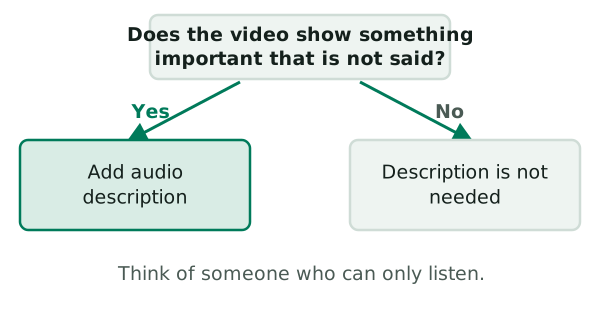
If the answer is no, description isn't needed. The W3C's example is a video of a person only talking.[1] If the video is audio only, such as a podcast, there is no visual information to describe.[1]
If the answer is yes, description is needed so that people who are blind and listening get the important visual information.[1]
Even when you don't need it, say so. The W3C suggests telling users when a video needs no description, so they don't think you forgot.[2]
What the standard asks for
The web accessibility standard, WCAG, has levels called A, AA and AAA. For a recorded video with important visuals, description or a descriptive transcript is required at Level A.[1] Description itself is required at Level AA.[1] The W3C adds that most media is required by policy to meet Level AA, which includes both A and AA.[2]
For live video, description isn't required to meet WCAG.[1] That doesn't mean it can't help. It means the standard stops short of asking for it.
Three ways to do it
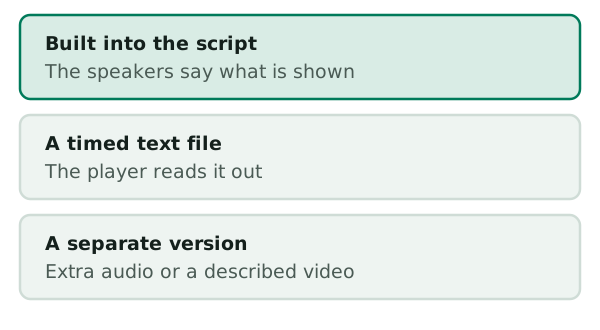
Build it into the script. The speakers describe what's on screen as they go. The W3C says the description is woven into what the main speakers say.[1] It's usually best for training videos, but not most stories.[1] In that case there is no additional cost.[1]
Use a timed text file. Someone writes the descriptions and adds times. A player that supports it reads them out. Check that your player can do this before you commit.
Make a separate version. Record the descriptions as extra audio, or make a second, described video.
Writing good description
Keep it simple:
- Say what's on screen, in present tense and active voice, in the third person.[1]
- Describe objectively, with no opinions or comment.[1]
- You don't need to describe every detail.[1]
The best time to think about this is at the planning stage. Thinking of it before filming cuts the cost and effort of description a great deal.[1] Many organizations still outsource it.[1]
Next, see how to test your finished file in checking video and audio.
Sources
- Description of Visual Information, W3C Web Accessibility Initiative (accessed 2026-11-10)
- Planning Audio and Video Media, W3C Web Accessibility Initiative (accessed 2026-11-10)